NewzDash – What’s New (October Update)
Here’s a concise rundown of the latest features, where to find them, and how they help your newsroom move faster.
1) AI Overview Tracking — Full Integration
Track Google’s AI Overviews everywhere you work in NewzDash:
How to read it:
- The AI star indicates an AI Overview exists for that query.
- A number next to the star is your ranking inside AI Overview.
- 0 means your site is not ranking in AI Overview for that query.
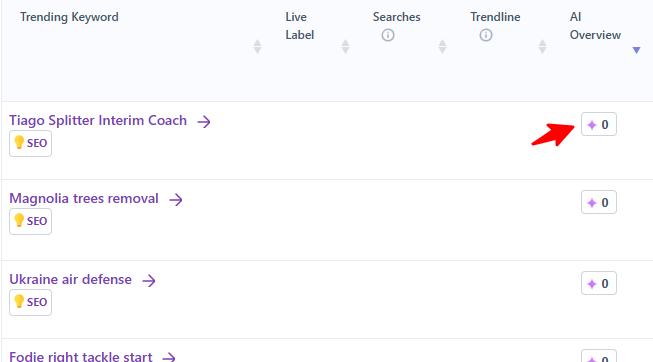
Why it matters: You can now quantify where AI Overviews appear, how often, and whether your site wins visibility inside them—across breaking trends and your strategic keyword lists.
2) Content Efficiency Report — New
Path: /reports/content-efficiency (img6)
For customers with the Headline Rankings (Content Rankings) add-on:
- We track every newly published article from your XML sitemap (updated ~every 15 minutes).
- Indexing check within ~1 hour of publish.
- Primary keyword detection and ranking tracking for up to 24 hours.
- Instant SEO recommendations to improve ranking and Top Stories eligibility.
Why it matters: See which fresh pieces are on track, which are stalling, and what to fix now—before traffic is lost.
3) Faster App Speed
We adopted new performance techniques to deliver noticeably faster page loads across major reports. Expect quicker pivots between tabs, filters, and pagination—especially on heavy tables and charts.
4) Google Discover – Enhanced Reports
Discover just got a round of workflow upgrades:
- More countries supported.
- Scheduled email reports (NEW): After running any Discover search, click “Stay updated with this report” to receive automated updates. Available on Live Articles, Domains, and Entities. (img7)
Manage in: /newzdash/settings/discover-emails - Article Timeline (NEW): Click Analyze Article to see title/image changes and displayed image sizes over time.
- Exclude Videos (NEW filter): Focus on article-only results with one click. (img8)
- Language filters expanded: Added language filters for Switzerland and India (in addition to the USA).
Why it matters: Sharper control, better monitoring, and proactive alerts for Discover’s fast-moving surface.
5) Visibility & Performance – New Section Filter
You can now filter visibility charts and tables by section (e.g., World, Tech, Sports) in addition to keyword filters. (img3)
Why it matters: Understand which desks are winning or slipping at a glance.
6) Internationalization — New Languages
The entire NewzDash interface is now available in French, German, and Spanish across almost all pages. We used a mix of AI translation and human review.
- How to switch: Use the language selector in the header (top-right) to change your UI language.
- Help us improve: If you notice a page that isn’t translated, or wording that doesn’t make sense in your language, please notify us and we’ll fix it quickly.
7) Rankings – Smarter Filtering & Saved Views
- Combine multiple filters in Rankings (e.g., “Sports + Missing (Competitors Only)”) to laser-focus your worklist. (img1)
- Save your favorite reports to Bookmarks.
- Save your customized filters as Saved Filters for any report—load them instantly next time. (img4)
Why it matters: Less clicking, faster repeat workflows, and consistent team views.
Pro tips / alternative uses
- Create Saved Filters per language + market (e.g., ES – México – Descubrimiento – Últimas 24h) so regional editors can jump straight into their view.
- Pair language selection with country/section filters in Discover and Visibility to build localized dashboards your teams can bookmark.
- For multinational newsrooms, set up scheduled Discover reports in the relevant language for each market to keep local teams updated without logging in.