News Article Template for SEO: The Anatomy of a Perfect Story in 2026


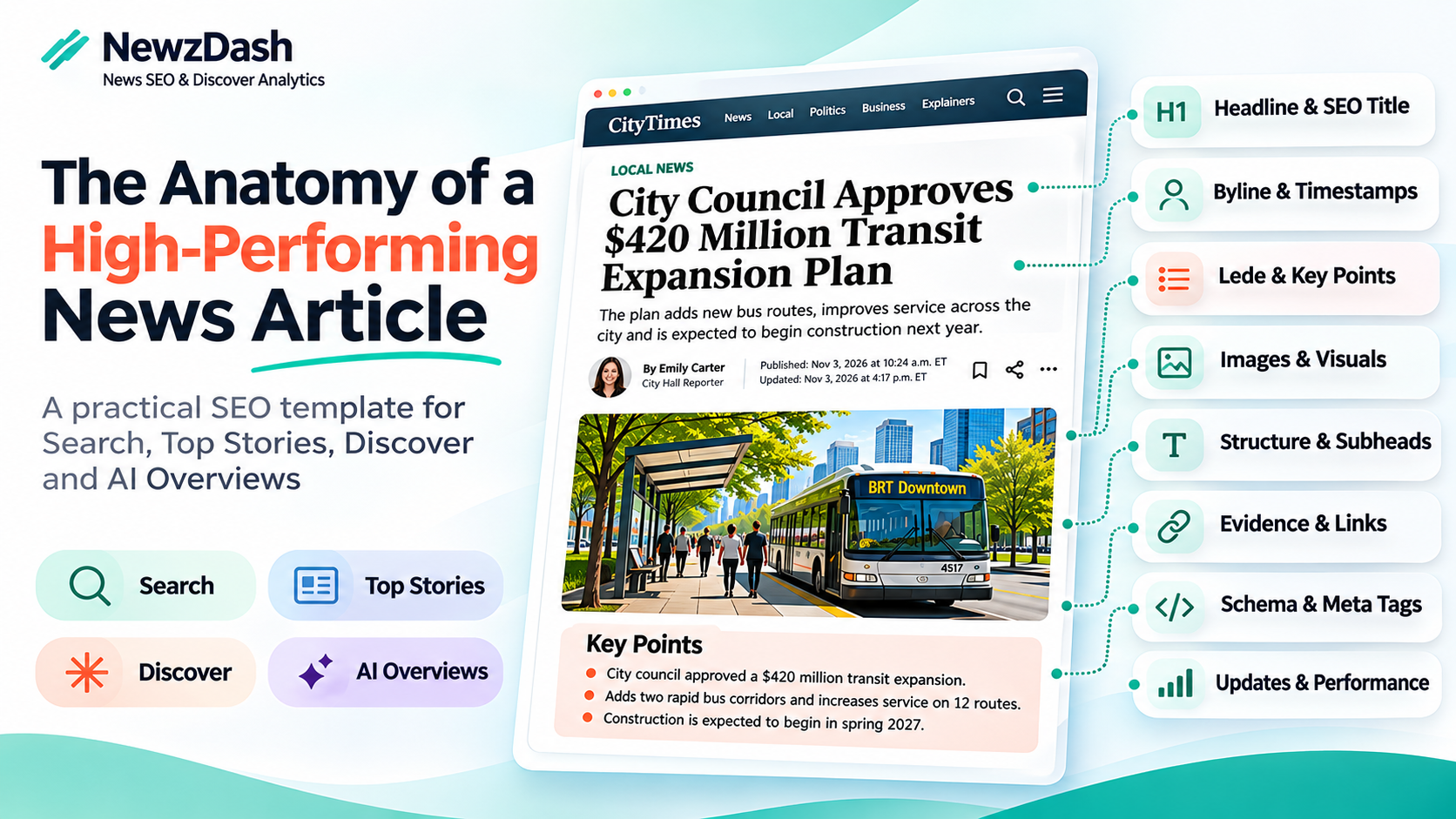
TL;DR: A news article template for SEO is the one page that shapes nearly every story you publish. Fix it once and the gains carry across Google Search, Top Stories, Google Discover, and AI Overviews. This updated template breaks a news article into 18 elements, explains what each one does, and shows which surface it serves. It replaces our 2023 version with what has changed since: AI answers, Google's February 2026 Discover core update, and higher expectations for trust signals.
In this guide:
- Why your news article template matters
- The template at a glance
- Above the fold: URL to follow buttons and lead image
- The lede and key points
- The article body and subheads
- Internal and external links
- Ads that pay without hurting SEO
- Behind the scenes: schema and meta tags
- End of article: author bio and next step
- After publishing
- The complete news article SEO checklist
Why your news article template matters more than any single story
Most newsroom SEO happens story by story. Template work is different. One change ships to every article you publish tomorrow.
In my experience working with more than 1,000 brands over two decades, article pages typically drive 80% or more of a news publisher's organic search traffic. That makes the article template the highest-leverage page you own.
It cuts both ways. A missing og:image or a schema date that disagrees with the visible date does not hurt one story. It hurts all of them. In our breakdown of Google Discover's content pipeline, we warned that a template or plugin change can look exactly like an algorithm drop.
AI search raises the stakes without changing the rules. Google says there are no additional requirements or special optimizations needed to appear in AI Overviews or AI Mode. Its guidance points back to fundamentals: important content in text, structured data that matches the visible page, and internal links. Your template is your AI strategy.
The news article template at a glance
| Element | Main surfaces | What to get right |
|---|---|---|
| 1. URL | Search | Short, readable, lowercase, hyphens |
| 2. SEO title | Search, Top Stories | Entity first, about 60 to 65 characters |
| 3. Breadcrumbs | Search, readers | Visible trail plus BreadcrumbList markup |
| 4. Headline (H1) | Google News, Discover | One H1 that matches the title |
| 5. Dek | Readers, snippets | One or two sentences that summarize the story |
| 6. Byline | Google News, trust | Linked author page, small headshot |
| 7. Timestamps | Search, Top Stories | Visible date and time that match schema |
| 8. Follow buttons | Top Stories, Google News | Preferred source and Google News follow prompts near the top |
| 9. Lead image or video | Discover | 1200 px or wider image in the code, even for video |
| 10. Lede | Search, AI Overviews | Five Ws, keyword, and entities up top |
| 11. Key points | Readers, AI Overviews | Live-text bullets on longer stories |
| 12. Article body | Discover, AI Overviews | Original reporting, sources, short paragraphs |
| 13. Subheads | Search, readers | H2s that outline the story |
| 14. Links | Search, AI Overviews | Descriptive inline links to hubs and prior coverage |
| 15. Ads | Readers, page experience | Under 30% mobile ad density, reserved slots, no intrusive formats |
| 16. Schema and meta tags | All surfaces | NewsArticle, Open Graph, canonical that match the page |
| 17. Author bio | Trust | Two or three lines, linked to the author page |
| 18. Closing and sharing | Loyalty, social | One next step and working share options |
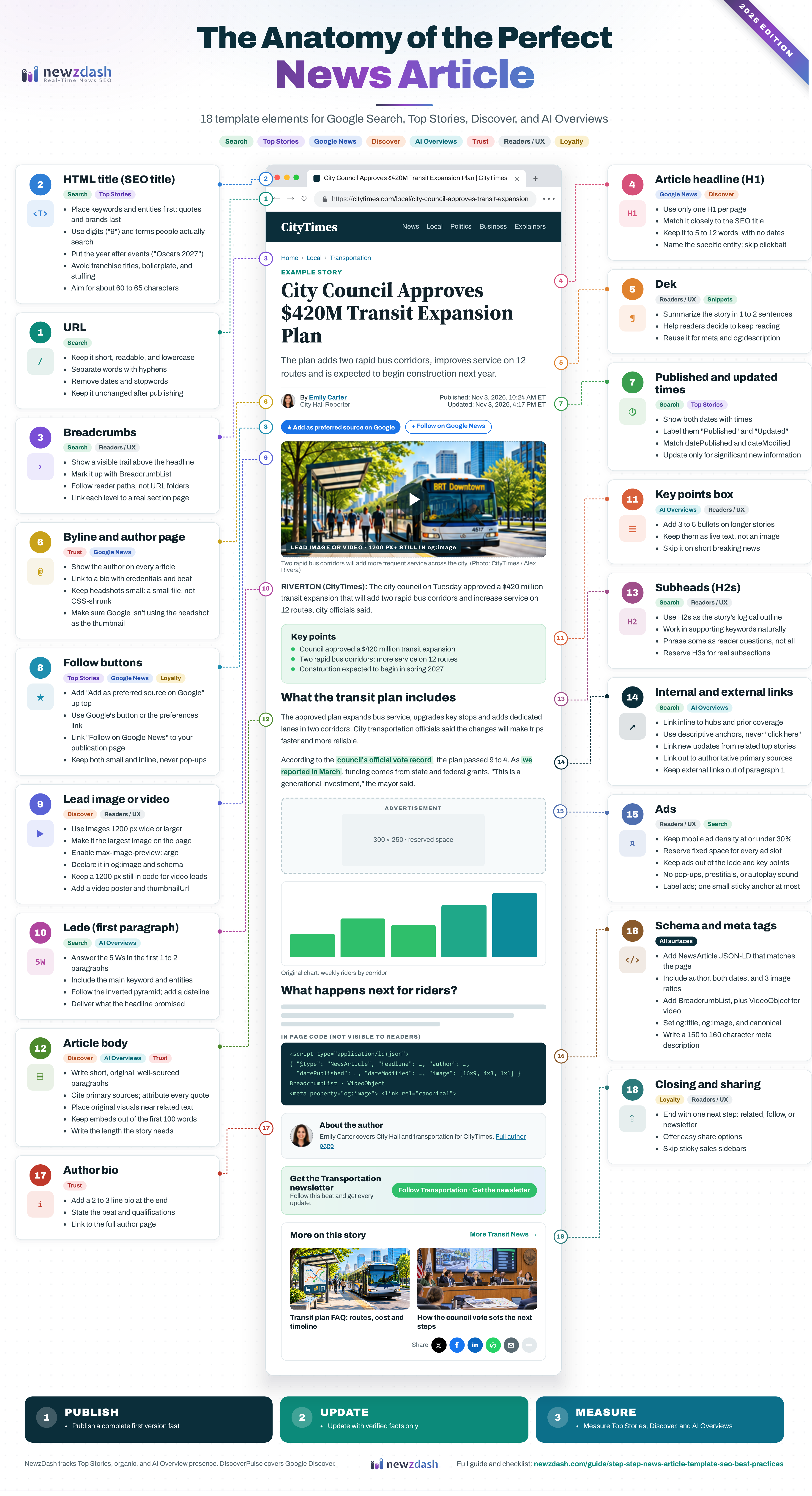
Above the fold: URL, titles, breadcrumbs, byline, dates, follow buttons, and lead image
1. URL. Google recommends readable words and hyphens rather than ID numbers and underscores. Because Google treats URLs as case sensitive, consistent lowercase avoids duplicates. Our house rule is to leave dates and stopwords out of the slug. Google frames URL structure as a crawling issue, not a ranking lever, so never change a published URL just because the story develops.
2. SEO title. Google sets no length limit but truncates titles to fit the screen, and it warns against vague, boilerplate, or keyword-stuffed titles. Our rules: put the primary keyword or entity first, aim for about 60 to 65 characters, use digits instead of spelled-out numbers, place the year after annual event names (Oscars 2027, not 2027 Oscars), and drop generic franchise titles like "Things to Know This Morning."
3. Breadcrumbs. Show a visible breadcrumb trail above the headline, such as Home › Local › Transportation, and mark it up with BreadcrumbList structured data. Google says breadcrumbs show a page's position in the site hierarchy and may help users understand and explore a site. Build the trail around how readers move through your sections rather than mirroring your URL folders, as Google recommends, and link each level to a real section or topic page. Every article then gets a built-in link to its hub.
4. Headline. Google's article page best practices call for a prominent H1 that matches the HTML title, between 2 and 22 words, with no date or time in it. In our experience, 5 to 12 words works best. Name the specific person, team, company, or place: "City Council Approves Transit Expansion Plan" beats "A Major Decision That Changes Everything." Google's Discover guidance asks for titles that capture the essence of the content, and its February 2026 Discover core update set out to reduce sensational content and clickbait. Our guide to the five headlines every article should have covers the promo, schema, and og:title variants.
5. Dek. The line under the headline summarizes the story in one or two sentences so readers can decide whether to keep going. Google has no dek requirement, but a strong dek is a natural starting point for your meta description and og:description.
6. Byline and author page. Google News lists clear dates and bylines and author information among its transparency expectations. Link every byline to an author page with credentials and beat history. Watch one template trap: Google's image selection is automated, and in our experience it sometimes picks the author headshot as the article's main image. Keep byline headshots small, serve a small image file rather than a large one scaled down with CSS, and make sure the lead image is the largest and most prominent image on the page.
7. Timestamps. Show a clear, visible date and time, and keep it consistent with datePublished and dateModified. Google News guidelines prohibit artificially freshening a story when no significant information was added.
8. Follow buttons: preferred source and Google News. Give loyal readers two small prompts near the top of the article, next to the byline or share icons: "Add as a preferred source on Google" and "Follow on Google News." Google says that when a reader selects your site as a preferred source, your content is more likely to appear for them in Top Stories, and it can carry a "preferred" badge in AI Overviews and AI Mode. Google offers an embeddable button that adds your site and returns readers to where they left off, or you can link to https://www.google.com/preferences/source?q=yourdomain.com. Only domain and subdomain sites are eligible, not subfolders.
For Google News, publication pages are now generated automatically, so find your publication on news.google.com and point your follow button to it. Some publications don't get a page, so check before you add the button. Keep both prompts small and inline. They are banners, not pop-ups.
9. Lead image or video. Discover recommends images at least 1200 px wide, with max-image-preview:large enabled. Google says you can influence which image it picks by declaring your preferred one in og:image or schema.org markup, and it advises against logos and text-heavy images there. Point og:image to an absolute HTTPS URL that returns a 200 and is not blocked by robots.txt. Use short, descriptive filenames, specific alt text, and a caption with credit.
If a video is the lead, keep a large image in the code anyway. Set og:image and the NewsArticle image to a still that is at least 1200 px wide, and give the video a poster image and a thumbnailUrl in VideoObject markup. A video player alone leaves Discover without the large image it needs for a strong card.
The lede and key points: answer first
10. Lede. Answer who, what, when, where, and why in the first one or two paragraphs, and include the primary keyword and main entities naturally. Start with a dateline when location matters. The inverted pyramid is the oldest rule in the newsroom, and in my view it is also the format answer engines find easiest to use.
11. Key points box. This is the one idea worth borrowing from marketing blog templates. On explainers, investigations, and long developing stories, three to five live-text bullets help readers who scan. Skip it on short breaking items. It is an editorial choice, not a Google requirement.
The article body and subheads
12. Article body. Write unique, readable copy: short paragraphs, one idea per paragraph, and bullets where they genuinely help. Support every key claim with primary sources such as court filings, datasets, and official statements, and attribute every quote. Google says its February 2026 Discover update aims to show more in-depth, original, and timely content from sites with expertise in a given area. Original reporting, data, and documents are your edge over dozens of rewrites of the same wire copy.
Use your own photos, charts, and maps, placed near the text they explain. Keep social embeds out of the first 100 words so the text that tells the story loads first. Google says it has no preferred word count, so write what the story needs. On live coverage, timestamp every update.
13. Subheads. Treat your H2s as the logical outline of the story. A reader who skims only the subheads should understand how it unfolds: what happened, the background, the reaction, and what comes next. Work in supporting and secondary keywords where they fit naturally. Some H2s can be phrased as reader questions, especially ones that appear in People Also Ask, but don't overdo it. A story outline reads better than a page of FAQs. Use H3s only for genuine subsections.
Internal and external links
14. Links. Internal links do two jobs. They help readers follow a developing story, and they help Google discover and understand your coverage. Google names internal links among the practices that help content get found, including in AI features.
Link inline to your topic hub or tag page and to the most relevant prior coverage. Use descriptive anchor text that tells readers what they will get, never "click here," and place links within the copy rather than in a list below the article. When you publish a major update, link to it from your related top-performing stories, as our ultimate news SEO checklist recommends. For external links, point to authoritative primary sources and keep them out of the first paragraph so readers get the story first.
Ads that pay without hurting SEO
15. Ads. Ads fund the newsroom, but the wrong ad stack costs you readers, Core Web Vitals, and sometimes the ad revenue itself. Google's page experience guidance asks whether your content avoids an excessive amount of ads that distract from or interfere with the main content, whether pages avoid intrusive interstitials, and whether visitors can easily tell the main content apart from everything else.
The industry benchmark is the Coalition for Better Ads' Better Ads Standards. On mobile, ads should take up no more than 30% of the vertical height of the main content, measured by adding up the height of every ad, sticky ads included. On desktop, the limit is 50%. Pop-ups, prestitials, full-screen scrollovers, flashing ads, autoplay video with sound, and large sticky ads all fall below the standard. These are not Google ranking rules, but Google's publisher policies require compliance, and Chrome can filter ads on sites that keep failing them. Google flags violations in its Ad Experience Report, which now lives in Google's web tools rather than the main Search Console menu.
Our house rules: keep the first screen for the headline, dek, byline, and lede, and place the first in-article ad after the opening paragraphs. Never split the lede or the key points box. Reserve fixed space for every slot so ads don't push content around, and keep that space when an ad doesn't fill. Use one small sticky anchor at most, label every unit "Advertisement," and avoid intrusive interstitials, which Google says make it hard for search engines to understand your content.
Behind the scenes: schema and tags that must match the page
16. NewsArticle structured data and meta tags. Google's Article markup has no required properties and is not required for Top Stories. The useful ones are headline, images in 16x9, 4x3, and 1x1, author with name and url, datePublished, and dateModified. Pair them with BreadcrumbList, VideoObject when a video leads, og:title, og:image, and a correct canonical. Google sets no meta description limit but truncates long ones, so we write unique summaries of about 150 to 160 characters. Schema, Open Graph, and the visible page should tell the same story.
End of article: author bio and a next step
17. Short author bio. Close with a two or three line bio: who the reporter is, what they cover, and why they are qualified to cover it, linked to the full author page. It answers the reader's last trust question, who wrote this, right when they decide whether to keep following the story.
18. Closing module and sharing. For publishers, the conversion is a return visit. End with related coverage, a topic follow option, or a newsletter signup tied to the beat, and offer simple share options for the platforms your audience uses. Skip the sticky sales sidebars that blog templates recommend.
After publishing: update honestly, then measure
Publish a complete, accurate first version fast, then add depth as verified information arrives and make material corrections visible.
Then measure the template, not just the story. Compare Top Stories, Discover, and AI Overview presence before and after every template change, and judge Discover over weeks, not hours.
The complete news article SEO checklist
Share this with editors, producers, and developers. Every item maps to an element above.
1. URL
- Keep the URL short, readable, and lowercase.
- Separate words with hyphens, not underscores.
- Remove dates and stopwords from the slug.
- Let the optimized headline shape the slug, since the URL itself carries limited ranking weight.
- Keep the URL unchanged after publishing, even as the story develops.
2. HTML title (SEO title)
- Write for readers scanning results, since this title appears in Top Stories and organic results.
- Compose clear, descriptive, and unambiguous titles.
- Place primary keywords and entities at the start, and move quotes and brands toward the end.
- Balance rankings (search keywords) with clicks (engagement).
- Use passive voice when it moves the main entity forward (e.g., "[Celebrity Name] was bitten by a dog").
- Pair entities (full names, organizations, events, locations) with keyword qualifiers whenever you can.
- Spell out crucial terms unless the abbreviation is commonly recognized.
- Use digits instead of words ("9," not "Nine").
- Choose terms people actually search for ("Pope John Paul Dies," not "Papacy Change").
- Place the year after annual event names ("Oscars 2027").
- Avoid generic franchise titles like "Things to Know This Morning."
- Aim for about 60 to 65 characters, since Google truncates long titles.
- Avoid boilerplate and repeated keywords.
3. Breadcrumbs
- Show a visible breadcrumb trail above the headline.
- Mark it up with BreadcrumbList structured data that matches the visible trail.
- Build the trail around how readers navigate your sections, not your URL folders.
- Link each level to a real section or topic page.
4. Article headline (H1)
- Use only one H1 per page.
- Match the H1 to the HTML title as closely as possible.
- Keep it to 5 to 12 words (Google News allows 2 to 22).
- Include the main keywords and name the specific person, team, company, or place.
- Leave dates and times out of the headline.
- Avoid sensational and clickbait phrasing.
5. Dek
- Summarize the story in one or two sentences directly below the headline.
- Give readers enough to decide whether to keep reading.
- Reuse the dek as the starting point for your meta description and og:description.
6. Byline and author page
- Show the author's name on every article.
- Link each byline to an author page with credentials and beat history.
- List each author separately in schema, with name and url.
- Keep byline headshots small, and serve a small file rather than a large image scaled down with CSS.
- Check that Google is not showing the author headshot as the article's thumbnail.
- Link to your editorial standards and corrections policy.
7. Published and updated timestamps
- Display the published date and time.
- Display the updated date and time when the story materially changes.
- Label both clearly ("Published," "Updated").
- Match visible dates to datePublished and dateModified.
- Change the updated time only for significant new information.
8. Follow buttons: preferred source and Google News
- Place "Add as a preferred source on Google" and "Follow on Google News" near the top of the article.
- Use Google's embeddable preferred source button, or link to google.com/preferences/source?q=yourdomain.com.
- Confirm your site is domain or subdomain level, since subfolders aren't eligible.
- Find your automatically generated Google News publication page and link the follow button to it.
- Keep both prompts small and inline, never as pop-ups or interstitials.
9. Lead image or video
- Use lead images at least 1200 px wide.
- Make the lead image the largest and most prominent image on the page.
- Enable max-image-preview:large.
- Declare your preferred image in og:image and the NewsArticle image property.
- Point og:image to an absolute HTTPS URL that returns a 200 and is not blocked by robots.txt.
- Avoid logos and text-heavy images as the preferred image.
- Keep a 1200 px or wider still image in og:image and schema when a video is the lead.
- Give lead videos a poster image and a thumbnailUrl in VideoObject markup.
- Name image and video files with short, descriptive filenames.
- Write specific alt text without keyword stuffing.
- Add captions and credits, including on gallery images.
10. Lede (first paragraph)
- Answer who, what, when, where, and why in the first one or two paragraphs.
- Include the primary keyword and main entities.
- Follow the inverted pyramid.
- Start with a location (dateline) when relevant.
- Deliver what the headline promised on the first screen.
11. Key points box
- Add three to five bullets on explainers, investigations, and long developing stories.
- Keep the bullets as live text, not an image.
- Skip the box on short breaking items.
12. Article body
- Write unique, readable copy with short paragraphs and one idea per paragraph.
- Use bullets where they genuinely help.
- Support key claims with primary sources such as court filings, datasets, and official statements.
- Attribute every quote.
- Add original reporting, data, or documents wherever you can.
- Use original photos, charts, and maps, placed near the text they explain.
- Keep social embeds out of the first 100 words.
- Write the length the story needs, since Google has no preferred word count.
- Timestamp every update on live coverage.
13. Subheads
- Use H2s as the logical outline of the story.
- Make the story understandable from the subheads alone.
- Work in supporting and secondary keywords where they fit naturally.
- Phrase some H2s as reader questions, especially People Also Ask questions, without overdoing it.
- Reserve H3s for genuine subsections.
14. Internal and external links
- Link inline to your topic hub or tag page.
- Link to the most relevant prior coverage of the story.
- Write descriptive anchor text, never "click here."
- Place links within the copy rather than in a list below the article.
- Link to major updates from your related top-performing stories.
- Link externally to authoritative primary sources.
- Keep external links out of the first paragraph.
15. Ads
- Keep mobile ad density at or below 30% of the main content’s height, counting sticky ads.
- Keep desktop ad density at or below 50%.
- Keep the first screen for the headline, dek, byline, and lede.
- Place the first in-article ad after the opening paragraphs, never inside the lede or key points.
- Reserve fixed space for every ad slot, and keep it when an ad doesn’t fill.
- Avoid pop-ups, prestitials, full-screen scrollovers, flashing ads, and autoplay video with sound.
- Use one small sticky anchor ad at most.
- Label every unit “Advertisement” so readers can tell ads from content.
- Check the Ad Experience Report after every ad stack change. It now sits in Google’s web tools rather than the main Search Console menu, and it requires a site verified in Search Console.
- Check the Core Web Vitals report in Search Console after every ad stack change.
16. NewsArticle schema and meta tags
- Add NewsArticle JSON-LD to every article.
- Match the schema headline to the SEO title.
- Include author (name and url), datePublished, dateModified, and image.
- Provide images in 16x9, 4x3, and 1x1 aspect ratios.
- Add BreadcrumbList markup, plus VideoObject markup when a video leads.
- Set og:title and og:image on every article.
- Set a correct canonical URL.
- Write a unique meta description of about 150 to 160 characters that includes the focus keyword.
- Validate markup with Google's Rich Results Test after every CMS or plugin release.
17. Author bio
- Add a two or three line bio at the end of every article.
- State who the reporter is, what they cover, and why they are qualified to cover it.
- Link the bio to the full author page.
18. End of article and social sharing
- End with one clear next step: related coverage, a topic follow, or a newsletter signup.
- Offer easy share options for the platforms your audience uses.
- Skip sticky sales sidebars and lead-generation widgets.
After publishing
- Publish a complete, accurate first version fast.
- Update the story as verified information arrives, and make material corrections visible.
- Audit 10 recent article URLs against this checklist after every template change.
- Benchmark Top Stories, Discover, and AI Overview presence before and after each change. NewzDash tracks Top Stories, organic, and AI Overview presence, and DiscoverPulse covers Discover. See our guide to AI visibility tracking for news publishers.
- Judge Discover performance over weeks, not hours.
For a printable PDF, click here.
Check our Master News SEO Series
- Google News Surfaces: Terminology, Impact on Traffic and More
- A Step-by-Step News Article Template with SEO Best Practices
- Google News SEO - Everything Publishers Need to Know 2023 Edition
- Guard Your SEO: Are News Syndication Partners Hijacking Your Traffic?
- Ultimate News SEO Checklist: How to Optimize Your News Articles Before Publishing
- Top 5 News Headlines Every Article Should Have and Optimize
- more to come ...